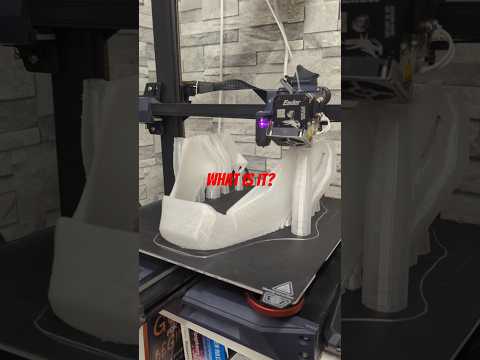
🔴 Live Build — MK85 Iron Man Suit

I 3D Printed an Iron Man Helmet.
Now I Have to Build the Whole Suit.

Raw prints, beginner-friendly electronics, a bit of Arduino where it counts — follow the full build from scratch.

Electronics Guide Build Log
Suit Progress 3 / 14 pieces
✓ MK85 Helmet ✓ Repulsor Glove ⟳ Chest Piece Back Plate Shoulders Upper Arms Forearms Thighs Shins Boots Waist Hip Plates Neck / Collar Undersuit

Three Pieces Down. Eleven to Go.

Each piece gets printed raw, then electronics get added. No painting yet — just raw grey PLA doing the work right now.
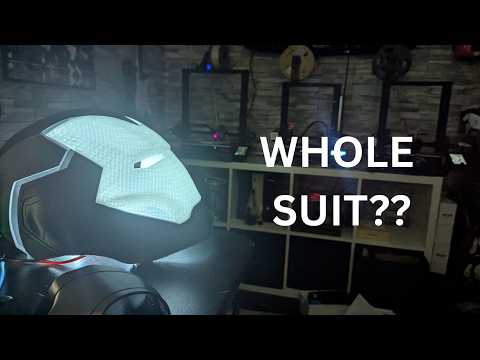
📸 Helmet Photo Complete

MK85 Helmet

Printed in 6 sections, assembled with superglue and filler. The eye gaps are left open ready for LEDs — deciding between a pre-made module and a custom Arduino glow effect.

Ender 3 PLA Grey ~52hr print 6 sections LED eyes next
📸 Glove Photo Complete

Repulsor Glove

Palm repulsor housing is printed and fits well. Planning a high-power LED in the palm with a push-button trigger in the finger — simple circuit, maximum impact.

PLA Grey Articulated fingers Palm LED housing Button trigger
📸 Chest In Progress Printing

Chest Piece + Arc Reactor

Currently on the print bed. The arc reactor housing is built into the chest — planning a WS2812B LED ring with an Arduino running a pulse animation. This one's going to look the part.

PLA Grey Arc reactor mount LED ring Arduino pulse

What Electronics Do You Actually Need?

You don't need to be an engineer. Here's exactly what to buy for each piece — pre-made options that just work, plus the upgrade path when you want more control.

🪖

Helmet — LED Eyes

The eye gaps in the MK85 are designed to glow. Two options depending on how much control you want.

🤚

Repulsor Glove — Palm LED

A single high-power LED in the palm, triggered by a button in the index finger. Simple circuit, looks incredible.

Chest — Arc Reactor

A WS2812B ring gives you full colour control and animation. An Arduino Nano runs the pulse effect with about 20 lines of code.

STL files used in this build are sourced from Printables and Thingiverse. Arduino code uses the FastLED library.

Complete Beginner Electronics Starter Kit
Everything you need to light up the helmet, glove, and arc reactor. No soldering required for the basic setup.
View on Amazon →

Where Arduino Actually Makes Sense

Pre-made modules get you glowing. Arduino gets you movie-accurate. Here's where the upgrade is worth it.

You don't need Arduino for everything — and I wouldn't start with it. But a few specific moments in the suit build are genuinely better with it, and the code is simple enough that a complete beginner can follow along.

I'll be documenting every Arduino build here with full wiring diagrams and code you can copy directly.

  • Arc Reactor Pulse Animation Easy Breathing glow effect on the chest LED ring. ~20 lines of code, looks exactly like the films.
  • Repulsor Charge Effect Easy Palm LED slowly charges up then bursts bright on button press. Dead simple and very satisfying.
  • Helmet Eye Flicker / Startup Sequence Medium Power-on animation with a flicker-to-stable effect. Needs WS2812B LEDs and about 40 lines of code.
  • Servo Faceplate Flip Coming Soon The holy grail. A servo mechanism that opens and closes the helmet faceplate. Full build guide coming when I get to it.
Arc Reactor Pulse — Starter Code
// Arc Reactor Pulse Effect
// WS2812B ring on pin 6, Arduino Nano

#include <FastLED.h>

#define NUM_LEDS  16
#define DATA_PIN  6

CRGB leds[NUM_LEDS];
int brightness = 0;
int step = 2;

void setup() {
  FastLED.addLeds<WS2812B, DATA_PIN, GRB>(leds, NUM_LEDS);
  FastLED.setBrightness(200);
}

void loop() {
  brightness += step;
  if (brightness >= 255 || brightness <= 40)
    step = -step;

  for (int i = 0; i < NUM_LEDS; i++)
    leds[i] = CHSV(140, 200, brightness);

  FastLED.show();
  delay(8);
}

Copy this directly into Arduino IDE. Install FastLED library first. Change CHSV(140,...) hue value to shift colour — 0 = red, 140 = blue-white.


Updates As It Happens

Raw progress notes from each build session. No gloss — just what worked, what didn't, and what's next.

Mar 2026

Chest Piece on the Bed — Arc Reactor Planning Begins

Helmet and glove are done as raw prints. Chest is currently printing in two halves — it's a big piece and needs splitting to fit the bed. While it runs I'm planning the arc reactor electronics: going with a 16-LED WS2812B ring and an Arduino Nano for the pulse animation. Ordered the components tonight.

Chest piece Arc reactor Electronics planning
Mar 2026

Repulsor Glove Done — 775 Views on First Reddit Post

Glove is printed and assembled. Posted the helmet video to r/3Dprinting and hit 775 views on the first day which is a decent sign. Comments asking about the eye gaps — people want to know if I'll keep them open for LEDs. Yes. Obviously yes. Starting to gather electronics for both the helmet and glove.

Repulsor glove Reddit Electronics sourcing
Mar 2026

MK85 Helmet Printed — The Suit Is Happening

Started this wanting just the helmet. Printed it in 6 sections, glued it together, put it on, and that was it — the whole suit became inevitable. Already printing the glove. This is now a project. The eye gaps are left deliberately open for LEDs — undecided between a pre-made module and going full Arduino for a custom startup sequence.

MK85 helmet 6-section print Build start

Watch the Build

Shorts and longer videos as each piece comes together.

Shorts

More on YouTube @EngineeringChaosDIY →


Common Questions

What 3D printer do you use?
Creality Ender 3 series. Most suit pieces are too large for a single print so they're split into sections and glued. Any mid-range FDM printer gets you there — you don't need anything fancy.
How long does the helmet take to print?
About 40–60 hours total across all 6 sections at 0.2mm layer height, 20% infill. That's spread across multiple days — not 60 hours straight.
What electronics do I need for the helmet?
At minimum, pre-made LED eye modules — they slot in and glow, zero wiring knowledge needed. For custom effects you'll want an Arduino Nano and WS2812B LEDs. Full guide above with exact parts and links.
Do I need to know how to code?
Not for the basics. Pre-made modules need no code at all. Even with Arduino, the arc reactor pulse effect is about 20 lines — I'm posting the full code here as I build it.
What filament do you use?
PLA for almost everything — easy to print, sands well, takes paint nicely. I'll switch to PETG for flex parts like finger joints. The raw grey PLA honestly looks great on camera before any finishing.